Start with the order
Prepare the load from a rate confirmation. Review its stops, rate, instructions, and the details that need to be right before processing.
Quick Dispatch · OrdersRate confirmations, dispatch, drivers, paperwork, and settlements— one place for the work behind every load.
Less chasing updates between tools. More clarity for the people keeping freight moving.
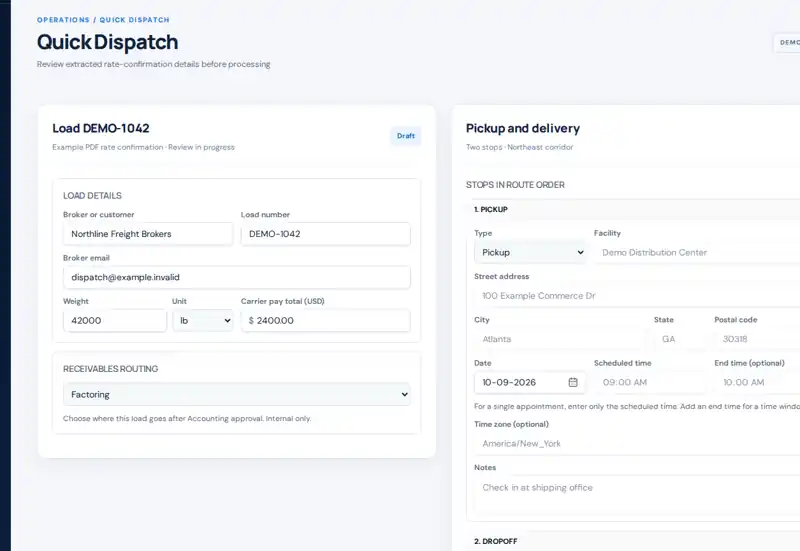
Quick Dispatch, Coverage, and settlement sections use genuine Muftar portal components; the submission overview uses a staged demo layout. All records are fictional. Not a live customer account or driver mobile app screenshot.
THE WORK BEHIND EVERY LOAD
A rate confirmation starts the job. Dispatch, drivers, paperwork, and accounting have to finish it. Muftar gives each handoff a place in the same operational story.
Prepare the load from a rate confirmation. Review its stops, rate, instructions, and the details that need to be right before processing.
Quick Dispatch · OrdersAssign the load and follow the work through dispatch, the driver app, coverage, and time-stamped conversations.
Dispatch · Coverage · MobileDrivers submit documents and expenses. The office reviews the records, approves them, or asks for corrections.
Documents · SubmissionsApproved load information supports invoicing, factoring preparation, and itemized settlement drafts for review.
Accounting · SettlementsTHE PRODUCT, NOT A SALES PITCH
Explore illustrations of three important carrier workflows. The records are fictional; the workflows reflect Muftar's carrier tools.
The office shouldn't have to reconstruct every load from messages, spreadsheets, and scattered files. Keep driver coverage, submissions, and settlement preparation connected to your organization's work.
Quick Dispatch, Coverage, and settlement sections use genuine Muftar portal components; the submission overview uses a staged demo layout. All records are fictional. Not a live customer account or driver mobile app screenshot.
BUILT FOR THE REAL OPERATION
Muftar connects the handoffs between the people who move freight and the people who keep the company running.
Orders, driver assignments, truck and trailer information, notes, and coverage decisions tied to the load.
Load instructions, document submissions, notes, expense receipts, and corrections in the driver app.
Review bills of lading, proof of delivery, lumpers, and accessorials before they move further into operations.
Prepare carrier receivables and draft driver settlements with fuel, reimbursements, deductions, and approved charges.
Give dispatch, accounting, drivers, and management appropriate access to the same company records.
Bring equipment history, hiring, and related operational records into your carrier workspace.
THE ROAD, CONNECTED
Load instructions and paperwork submission belong in the driver's workflow, with a review trail for dispatch and accounting. The mobile app helps close that gap.
 Driver · Demo
Current load · MF-1042
Atlanta, GA → Charlotte, NC
BOL / POD
3 scanned pages · Ready to submit
Multi-page scanning, load notes, and a clear path to correct rejected paperwork.
TRANSPARENT CARRIER PRICING
Understand the carrier processing cost before you start. Use pay-as-you-go billing or choose a prepaid load bundle for a lower per-load rate.
Prepare and review your work before processing. No token bundle purchase is required to use the pay-as-you-go option.
Bundle pricing varies with the quantity you purchase, from $4.50 to $2.50 per load. Bundles are prepaid; optional services have separate terms.
SELF-SERVICE FROM DAY ONE
Muftar uses automated verification for people and organizations before protected company operations are activated. Go through setup at your own pace.
Start with a free personal account. No sales appointment needed.
Complete the required automated Stripe Identity checks.
Create or join an organization and complete automated business verification.
Review carrier billing, configure your team, and process when you're ready.
Verification completion times vary. These steps do not guarantee approval, and exceptional checks can still be required.
See the onboarding processONE VISION. BUILT IN STAGES.
The connected carrier experience is the place to start. Dedicated broker and shipper workspaces are part of Muftar's future direction—not capabilities we're presenting as already released.
Explore the planned broker experience, including shipment execution, carrier coordination, and documents.
Explore the roadmapLearn about the planned connected shipment view and the direction of the shipper experience.
See what's plannedYOUR NEXT LOAD STARTS HERE
Register, verify your identity and organization, and start using Muftar without waiting for a sales demonstration.
No mandatory demo · Automated verification · Carrier pay-per-load pricing